
I have brought a arduino kit in 2016 but haven’t played with it. Finally have some taste on it.

Install sketch – official software from arduino
Add “Adafruit unified sensor” & SimpleDHT library in sketch, then create a new file.
Code
/* install "Adafruit unified sensor" and simpleDHT library in sketch */
#include <Adafruit_Sensor.h>
#include <DHT.h>

/* Include the software serial port library */
#include <SoftwareSerial.h>
/* to communicate with the Bluetooth module's TXD pin */
#define BT_SERIAL_TX 10
/* to communicate with the Bluetooth module's RXD pin */
#define BT_SERIAL_RX 11
/* Initialise the software serial port */
SoftwareSerial BluetoothSerial(BT_SERIAL_TX, BT_SERIAL_RX);

/*  what digital pin DHT connected to */
#define DHTPIN 7
// Uncomment whatever type you're using!
#define DHTTYPE DHT11   // DHT 11
//#define DHTTYPE DHT22   // DHT 22  (AM2302), AM2321
//#define DHTTYPE DHT21   // DHT 21 (AM2301)

DHT dht(DHTPIN, DHTTYPE);

void setup() {
  Serial.begin(9600);
  Serial.println("Temperature and Humidity to bluetooth");
  dht.begin();

  BluetoothSerial.begin(9600);
  delay(1000);

  // Should respond with OK
  BluetoothSerial.print("AT");
  waitForResponse();

  // Should respond with its version
  BluetoothSerial.print("AT+VERSION");
  waitForResponse();

  // Set pin to 1234
  BluetoothSerial.print("AT+PIN1234");
  waitForResponse();

  // Set the name to BLU
  BluetoothSerial.print("AT+NAMEBLU");
  waitForResponse();

  Serial.println("Finished setup!");
}

void loop() {
  // Give it time to calibrate
  delay(10000);

  float h = dht.readHumidity();
  // Read Celsius
  float t = dht.readTemperature();
  // Read Fahrenheit (isFahrenheit = true)
  float f = dht.readTemperature(true);

  // Check errors
  if (isnan(h) || isnan(t) || isnan(f)) {
    Serial.println("Failed to read from DHT sensor!");
    return;
  }

  // Compute heat index in Fahrenheit (the default)
  // float hif = dht.computeHeatIndex(f, h);
  // Compute heat index in Celsius (isFahreheit = false)
  // float hic = dht.computeHeatIndex(t, h, false);

  Serial.println("Humidity: " + String(h) + "%, Temperature: " + String(t) + "^C");
  BluetoothSerial.println("Humidity: " + String(h) + "%, Temperature: " + String(t) + "^C");
}

// Function to pass BlueTooth output through to serial port output
void waitForResponse() {
  delay(1000);
  while (BluetoothSerial.available()) {
    Serial.write(BluetoothSerial.read());
  }
  Serial.write("\n");
}
Verify code, then connect the Ardunio board, and upload the file.
If it failed to upload, disconnect the bluetooth module. sending/receiving bluetooth data may interrupt the code upload.
Now let’s see the value from receiver via bluetooth, the simplest way to connect a android phone. Pair it up by bluetooth, install a terminal app, e.g. Bluetooth Terminal HC-05. (blueTerm does not work for my old GS3)
value will display on screen:
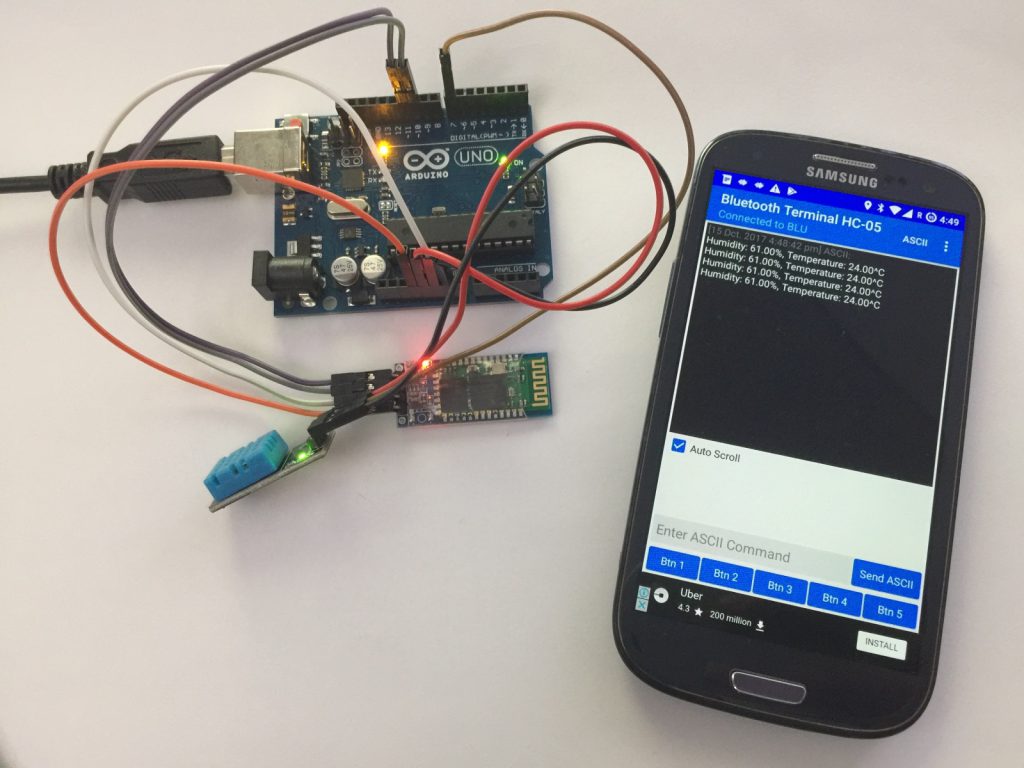
Connections:
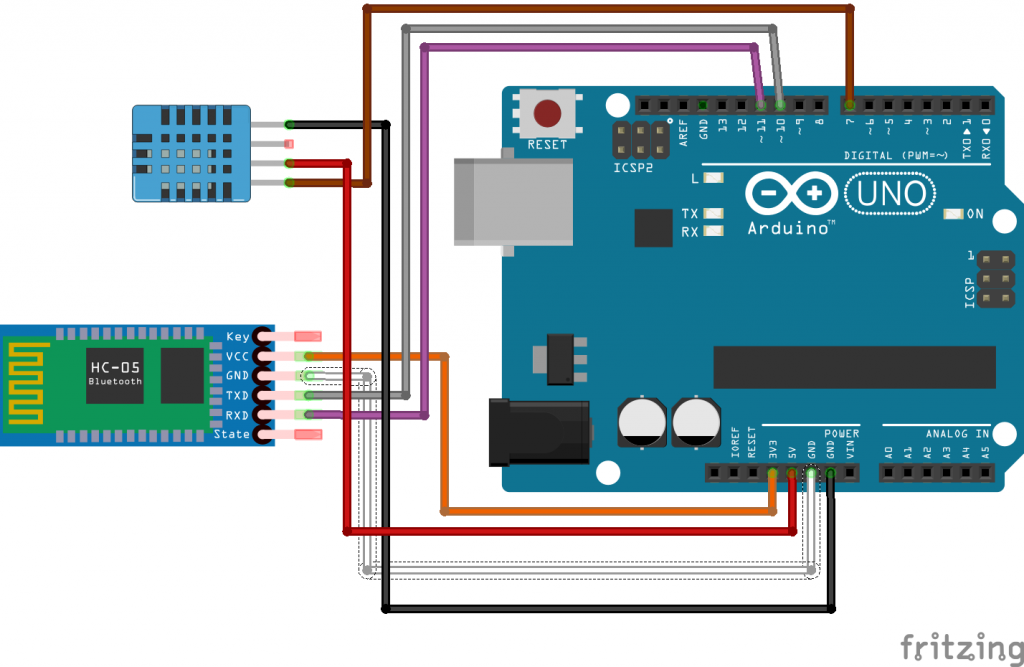
reference:
http://blog.whatgeek.com.pt/2015/09/arduino-bluetooth-wireless-communication/
http://www.instructables.com/id/ArduinoAndroid-Bluetooth-HC-06-Module-DHT11-Temp-M/