This article provide a guidance to complete GSP328 Serverless Cloud Run Development: Challenge Lab. It won’t provide steps directly, only tips to finish the lab. The challenge contains 7 tasks. As it has staging and production environment, so actually is 3 different sets of tasks. Provision the Qwiklabs environment run those commands to set config and …

This blog post is recording my journey on proof of concept development on ionic 4 capacitor & PWA development in December 2018, just note down some obstacles I faced or founding in the journey, and this is not a tutorial. Although Progressive Web Apps (PWA) are installable without app store, as of today business requirement …
唔想每個server 行一次 ssh 再run command,寫個script 同做一次所有servers 既時間差。不過下次再run 就可以慳好多時間。IaC / automation always win. Ansible playbook 可能都有,可惜冇機會用到Ansible 。 放左去gist。有用既請拍下 likecoin ,Thanks:)
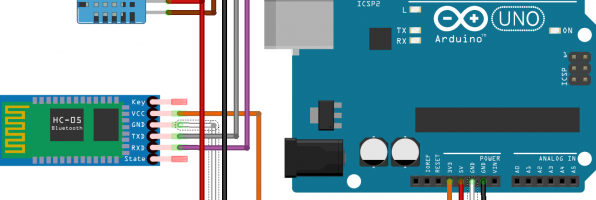
I have brought a arduino kit in 2016 but haven’t played with it. Finally have some taste on it. Install sketch – official software from arduino Add “Adafruit unified sensor” & SimpleDHT library in sketch, then create a new file. Code /* install “Adafruit unified sensor” and simpleDHT library in sketch */ #include <Adafruit_Sensor.h> #include …
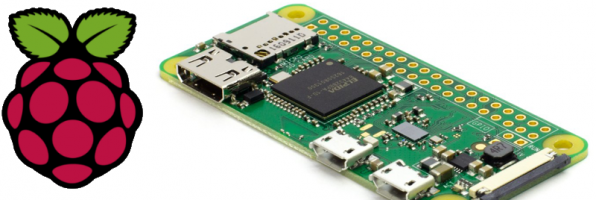
headless setup according to https://core-electronics.com.au/tutorials/raspberry-pi-zerow-headless-wifi-setup.html unfortunately it does not work for me, there is no IP address assigned in router info page. Connect Pi Zero W with HDMI and USB keyboard. I don’t have mini-USB to USB converter, surprisingly the OTG converter works. $ sudo vim.tiny /etc/wpa_supplicant/wpa_supplicant.conf ctrl_interface=DIR=/var/run/wpa_supplicant GROUP=netdev update_config=1 country=AU # Home Network network={ ssid=”SSID1″ …

recently migrated wordpress to GCP, using cloud launcher – wordpress by bitnami. That pretty easy, google other tutorials and follow it. e.g. https://console.cloud.google.com/launcher/details/bitnami-launchpad/wordpress http://www.compoundtheory.com/migrating-my-blog-to-google-cloud-platform/ Set up here is some highlighted procedures 1. create compute engine via clound launcher 2. create cloud SQL – db username and password 3. mysqldump old wordpress database 4. load …

Recently I was assigned to a task about adding a file upload feature to a existing nginx server on CentOS. Nginx was chosen years ago because it simply handles some static files only. If the file upload was a requirement, using apache is simpler as computation power isn’t a constraint in our case. Background CentOS 7 …

CentOS 6 1. 移除sendmail 安裝postfix # /etc/init.d/sendmail stop # yum remove sendmail # yum install postfix cyrus-sasl mailx 2. Gmail username and password Simple Authentication and Security Layer (SASL) # echo “smtp.gmail.com GMAIL_USERNAME:GMAIL_PASSWORD” > /etc/postfix/sasl_passwd # chmod 600 /etc/postfix/sasl_passwd # postmap hash:/etc/postfix/sasl_passwd 3. Postfix 設定 vim /etc/postfix/main.cf myhostname = xxxx.hang321.net mydomain = hang321.net # use Gmail SMTP …
## installation sudo apt-get install apparmor lxc cgroup-lite sudo apt-get install docker.io ## verification sudo service docker.io start sudo docker run hello-world ## show current images sudo docker images ## view location sudo cat /var/lib/docker/repositories-aufs | python -m json.tool ## change docker image installation directory sudo docker ps -q | xargs docker kill sudo service docker.io …

similar to previous blog: https://www.hang321.net/2014/08/16/debian-chroot-on-dsm/ Prerequisite: add custom source: Package Centre > Settings > Package Sources > add Name: SynoCommunity Location: https://packages.synocommunity.com/ Installation: – select Debian Chroot and click install – select yes to install python (SynoCommunity version) as well. – after installation completed, ssh to DSM as root root@diskstation> /var/packages/debian-chroot/scripts/start-stop-status chroot bash: warning: setlocale: LC_ALL: cannot change …